
Shipping and fees
A section that displays regional shipping fees and delivery times in table form. It can also present the carrier name and the free-shipping threshold, and suits shipping information pages and the cart page. Each table row is entered manually as a block.
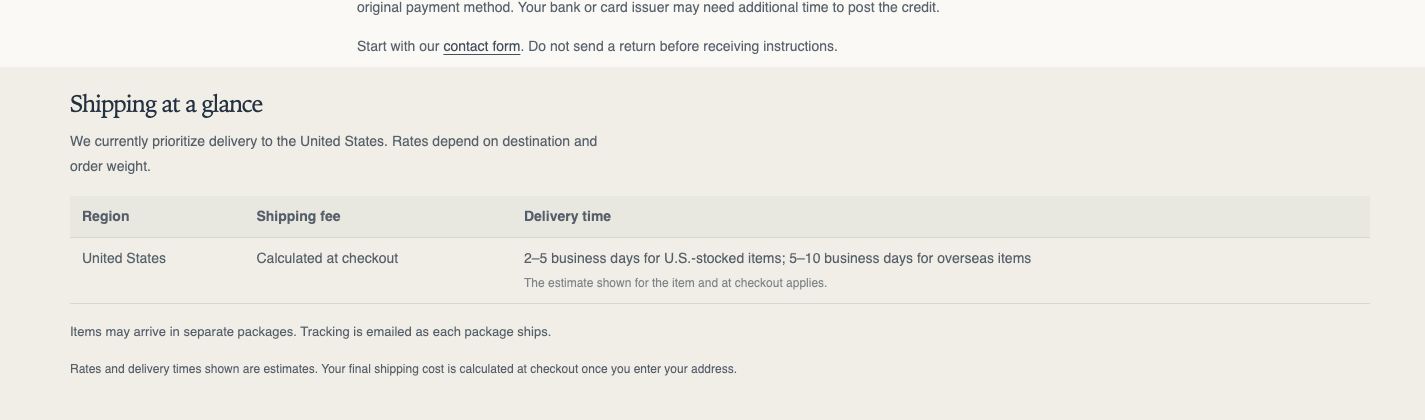
Origin: Hellostore original
How to add it
Section titled “How to add it”It comes pre-placed in the bundled cart page and shipping information page (page.shipping-info). To place it elsewhere, open the theme editor (in the admin: “Online store → Themes → Customize”), and on the page where you want it, choose “Shipping and fees” from “Add section”. It can be added to any page type (except header and footer areas).
Settings
Section titled “Settings”Heading and copy
Section titled “Heading and copy”- Heading: The section heading (default: About shipping and fees)
- Heading size: (default: Small). Choose from Small, Medium, Large, Extra large, and Extra extra large
- Text alignment: (default: Follow theme setting). Choose Follow theme setting, Left, Center, or Right. The heading and the text around it move together
- Intro text: Explanatory text shown before the table. Hidden when blank
- Carrier name: Enter the name of the carrier you use. It differs store by store, so the theme ships with no default. Hidden when blank
- Carrier link: Sets a link on the carrier name. Blank shows plain text
- Show free shipping threshold: Shows the amount of the “Free shipping amount” theme setting. Off at first because the product-page purchase guidance shows the same amount (default OFF). Turn it on when you place the section on a shipping information page. The bundled shipping information page (
page.shipping-info) has it on from the start - Show delivery time column: Shows a delivery-time column in the table (default ON). Even when on, no table appears if there are no rows. A row with an empty delivery time shows an empty cell on desktop, and the field is hidden on mobile
- Color scheme: The section’s color scheme
Padding
Section titled “Padding”- Top / Bottom: Padding above and below the section (default 36 / 36)
Blocks
Section titled “Blocks”Shipping rate row
Section titled “Shipping rate row”One row of the fee table.
- Region: The row’s target region (e.g., Honshu)
- Shipping fee: For ¥800, enter
80000(100 times the amount). If the “Shipping fee text” below is filled in, that text is shown instead. If both the fee and the text are empty, the fee cell is empty - Shipping fee text: For values that aren’t a simple amount — “Free”, “At cost”, “From ¥800”, and so on. When entered, it takes precedence over the numeric value above
- Delivery time: Enter something like “2-3 days”. There is no default. When blank, the cell stays empty
- Note: A supplementary note attached to the row. It appears under the delivery time. When “Show delivery time column” is off, it appears under the region name
Cash on delivery fee row
Section titled “Cash on delivery fee row”One row of the cash-on-delivery (COD) fee table. Lay out fees per order-value band.
- Order amount: The order-value band the fee applies to (e.g., Up to ¥10,000)
- Fee: For ¥330, enter
33000(100 times the amount). If the “Fee text” below is filled in, that text is shown instead - Fee text: The display text for values that aren’t a simple amount
Supplementary text placed beneath the table (rich text).
- Note text: Notes such as surcharges (default: Additional charges may apply depending on the region.)